The QuokkaSim Book
Welcome to the QuokkaSim Book – your guide to learning and mastering QuokkaSim, the Rust-based discrete-event simulation framework.
As of the 18th September 2025, QuokkaSim is at version
0.2.2, with development underway for version0.3.0. The new version will include a large restructure of the QuokkaSim API and will cause breaking changes. The current estimated release date is late October 2025.These changes aim to:
- Make it easier to create and integrate custom resources and components
- Make compile-time errors more useful by relying more heavily on Rust traits instead of macros
Current changes for
0.3.0can be found on the refactor/v3 branch.
What is QuokkaSim?
QuokkaSim is a high-performance, event-driven simulation framework written in Rust, on top of the NeXosim simulation engine.
QuokkaSim is also:
- Open source
- Permissively licensed (via the MIT License)
- Memory-safe
- Highly performant, via the NeXosim crate
- Accessible to new simulation modellers and new Rust developers
Who should read this book?
This book is written primarily for new and experienced simulation modellers, who are new to the Rust programming language and NeXosim simulation engine. The aim of this book (and QuokkaSim more generally) is to provide a structured way to learn QuokkaSim with as minimal friction as possible with the Rust compiler.
For new simulation modellers:
- Chapter 1: Getting Started is a Quick Start Guide to running and modifying your first QuokkaSim model.
- Chapter 2: A Conceptual Overview explores the specific concepts used by QuokkaSim, with the aim of new users being able to map real-world scenarios into QuokkaSim concepts, even before touching the code.
- Chapter 3: Building Your Simulation Model dives into the code, guiding you through how to navigate parsing through an example simulation, and building your own.
- Chapter 4: Examples summarises a number of example QuokkaSim models, which can be referenced for how to implement different types of custom logic and features.
FAQ
Why does QuokkaSim use Rust?
-
Incredible performance without the need to write plain C code
-
Building with Rust means we can make QuokkaSim free, open source and permissively licensed, to democratise simulation software - making world-class simulation modelling accessible beyond those with licenses to proprietary software.
-
Rust's strict compiler ensures all possible cases are explicitly handled and enforces the principle of making impossible states unrepresentable. This aligns perfectly with simulation modeling, where defining clear rules and handling unforeseen edge cases is crucial for reliable extrapolation beyond empirical data and known behaviours.
-
Rust is the world's most admired programming language, and has maintained this status for the last 8 years
Why choose QuokkaSim over SimPy?
Two main points:
- Performance - plain and simple. Faster performance and a smaller memory footprint means not only faster model development and scenario runs, but also unlocks many more opportunities for use e.g. integrations into ML models, embedment in web applications etc.
- Maintainability especially for larger simulation models. Different from SimPy, QuokkaSim provides a comprehensive framework of components that can be used as-is, or extended by defining custom components, and also benefits from the strictness of Rust's compiler and borrow checker, to provide modellers less time debugging 'plumbing' issues, and more time on business logic and features.
Yes, this FAQ is bare. Please let JJ know if you have any questions - I'd like to add more to this section!
Chapter 1: Getting Started
Welcome to your first QuokkaSim simulation! In this chapter you will
- Install Rust
- Create a new Rust project
- Add QuokkaSim as a dependency
- Write and run a minimal "hello world" simulation
1.1. Install Rust
Follow the instructs on the Rust Lang website to install Rust on your operating system. These instructions will help you install:
rustup, the Rust installer, andcargo, the Rust package manager
To check if installation is successful, use cargo -V to check which version of Cargo you have installed.
1.2. Create a new Rust project
If you don’t already have a project, open a terminal and run:
cargo new hello‐quokkasim
cd hello‐quokkasim
This creates a fresh binary crate with src/main.rs.
1.3. Add QuokkaSim to Cargo.toml
To add QuokkaSim as a dependency, use cargo add quokkasim or add the following to your Cargo.toml file before running cargo fetch:
[dependencies]
quokkasim = "0.3.0-alpha"
1.4. Write your first Simulation
In your main.rs file, paste the following imports which will be used in this example.
#![allow(unused)]
fn main() {
use quokkasim::prelude::*;
use std::time::{Duration, SystemTime};
}
Next we create the individual interactive components of our simulation
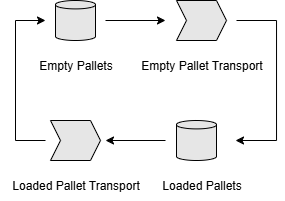
Empty Pallets hold a discrete number of pallets, which Empty Pallet Transport moves at specific times, into Loaded Pallets. In reality there may be a specific process to load material onto the pallets, but we will consider this negligible for the sake of example. Loaded Pallet Transport then moves pallets to Empty Pallets and the cycle continues.
Add the following into the main() function to create these components, and to connect them together.
#![allow(unused)]
fn main() {
    let mut df = DistributionFactory::new(97531);

    let mut empty_pallets: DefaultDiscStock<i32, DiscStockState, DiscStockLog<i32>> = DefaultDiscStock::new()
        .with_name("EmptyPallets")
        .with_code("EP")
        .with_initial_resources(vec![0,1,2,3].into());
    let (empty_pallets_mbox, empty_pallets_addr) = empty_pallets.create_mailbox();

    let mut empty_pallet_transport = DefaultDiscProcess::new()
        .with_name("EmptyPalletTransport")
        .with_code("EPT")
        .with_process_time_distr(df.create(DistributionConfig::Exponential { mean: 60.0 }).unwrap());
    let (empty_pallet_transport_mbox, empty_pallet_transport_addr) = empty_pallet_transport.create_mailbox();

    let mut loaded_pallets: DefaultDiscStock<i32, DiscStockState, DiscStockLog<i32>> = DefaultDiscStock::new()
        .with_name("FullPallets")
        .with_code("FP")
        .with_initial_resources(vec![4,5,6,7].into());
    let (loaded_pallets_mbox, loaded_pallets_addr) = loaded_pallets.create_mailbox();

    let mut loaded_pallet_transport = DefaultDiscProcess::new()
        .with_name("FullPalletTransport")
        .with_code("FPT")
        .with_process_time_distr(df.create(DistributionConfig::Exponential { mean: 120.0 }).unwrap());
    let (loaded_pallet_transport_mbox, loaded_pallet_transport_addr) = loaded_pallet_transport.create_mailbox();

    // Connections

    let mut c = Connection {};
    c.connect((&mut empty_pallets, &empty_pallets_addr), (&mut empty_pallet_transport, &empty_pallet_transport_addr)).unwrap();
    c.connect((&mut empty_pallet_transport, &empty_pallet_transport_addr), (&mut loaded_pallets, &loaded_pallets_addr)).unwrap();
    c.connect((&mut loaded_pallets, &loaded_pallets_addr), (&mut loaded_pallet_transport, &loaded_pallet_transport_addr)).unwrap();
    c.connect((&mut loaded_pallet_transport, &loaded_pallet_transport_addr), (&mut empty_pallets, &empty_pallets_addr)).unwrap();

}
Next we'll add some Logger instances to report on what occurs during the simulation, and connect them to our Process and Stock components.
#![allow(unused)]
fn main() {
    let process_logger = EventQueue::<DiscProcessLog<i32>>::new();
    empty_pallet_transport.log_emitter.connect_sink(&process_logger);
    loaded_pallet_transport.log_emitter.connect_sink(&process_logger);


    let stock_logger = EventQueue::<DiscStockLog<i32>>::new();
    empty_pallets.log_emitter.connect_sink(&stock_logger);
    loaded_pallets.log_emitter.connect_sink(&stock_logger);
}
Then we create our Simulation object sim, which controls the progression of the simulation.
#![allow(unused)]
fn main() {
    let sim_init = SimInit::new()
        .add_model(empty_pallets, empty_pallets_mbox, "EP")
        .add_model(empty_pallet_transport, empty_pallet_transport_mbox, "EPT")
        .add_model(loaded_pallets, loaded_pallets_mbox, "FP")
        .add_model(loaded_pallet_transport, loaded_pallet_transport_mbox, "FPT");

    let start_time = MonotonicTime::try_from_date_time(2025, 7, 1, 0, 0, 0, 0).unwrap();
    let duration = Duration::from_secs(3600);

    let (mut sim, _) = sim_init.init(start_time).unwrap();
}
We send and initialisation events, tell our simulation to run for an hour, and prints the results. Some logic is also included to view the model execution time.
#![allow(unused)]
fn main() {
    let time_at_start = SystemTime::now();
    sim.step_until(start_time + duration).unwrap();
    let time_at_end = SystemTime::now();

    // Output logs

    for log in process_logger.into_reader() {
        println!("{:?}", log);
    }

    for log in stock_logger.into_reader() {
        println!("{:?}", log);
    }

    println!("Execution time: {:?}", time_at_end.duration_since(time_at_start));

}
Our main.rs file is now complete (or refer to the Full Code below if you think you're missing something).
Finally, use cargo run to run the simulation. If you see data logs in the terminal instead of errors, you're done! You can also try a production build and run by using cargo run --release, and compare the difference compilation and execution times.
1.5. Exercises
Want to start playing around immediately? Here are some ideas of things you can try before moving on with the rest of the book!
- 1 hour is simulated to begin with. What if we simulate for longer?
- What happens if all the pallets begin at Empty Pallets?
- What happens if there can only be up to 2 pallets at a time in Loaded Pallets? You can use the
.with_max_capacitymethod of the stock to configure this.
Full Code
use quokkasim::prelude::*;
use std::time::{Duration, SystemTime};
fn main() {

    // Components

    let mut df = DistributionFactory::new(97531);

    let mut empty_pallets: DefaultDiscStock<i32, DiscStockState, DiscStockLog<i32>> = DefaultDiscStock::new()
        .with_name("EmptyPallets")
        .with_code("EP")
        .with_initial_resources(vec![0,1,2,3].into());
    let (empty_pallets_mbox, empty_pallets_addr) = empty_pallets.create_mailbox();

    let mut empty_pallet_transport = DefaultDiscProcess::new()
        .with_name("EmptyPalletTransport")
        .with_code("EPT")
        .with_process_time_distr(df.create(DistributionConfig::Exponential { mean: 60.0 }).unwrap());
    let (empty_pallet_transport_mbox, empty_pallet_transport_addr) = empty_pallet_transport.create_mailbox();

    let mut loaded_pallets: DefaultDiscStock<i32, DiscStockState, DiscStockLog<i32>> = DefaultDiscStock::new()
        .with_name("FullPallets")
        .with_code("FP")
        .with_initial_resources(vec![4,5,6,7].into());
    let (loaded_pallets_mbox, loaded_pallets_addr) = loaded_pallets.create_mailbox();

    let mut loaded_pallet_transport = DefaultDiscProcess::new()
        .with_name("FullPalletTransport")
        .with_code("FPT")
        .with_process_time_distr(df.create(DistributionConfig::Exponential { mean: 120.0 }).unwrap());
    let (loaded_pallet_transport_mbox, loaded_pallet_transport_addr) = loaded_pallet_transport.create_mailbox();

    // Connections

    let mut c = Connection {};
    c.connect((&mut empty_pallets, &empty_pallets_addr), (&mut empty_pallet_transport, &empty_pallet_transport_addr)).unwrap();
    c.connect((&mut empty_pallet_transport, &empty_pallet_transport_addr), (&mut loaded_pallets, &loaded_pallets_addr)).unwrap();
    c.connect((&mut loaded_pallets, &loaded_pallets_addr), (&mut loaded_pallet_transport, &loaded_pallet_transport_addr)).unwrap();
    c.connect((&mut loaded_pallet_transport, &loaded_pallet_transport_addr), (&mut empty_pallets, &empty_pallets_addr)).unwrap();


    // Loggers
    let process_logger = EventQueue::<DiscProcessLog<i32>>::new();
    empty_pallet_transport.log_emitter.connect_sink(&process_logger);
    loaded_pallet_transport.log_emitter.connect_sink(&process_logger);


    let stock_logger = EventQueue::<DiscStockLog<i32>>::new();
    empty_pallets.log_emitter.connect_sink(&stock_logger);
    loaded_pallets.log_emitter.connect_sink(&stock_logger);

    // Simulation initialisation
    let sim_init = SimInit::new()
        .add_model(empty_pallets, empty_pallets_mbox, "EP")
        .add_model(empty_pallet_transport, empty_pallet_transport_mbox, "EPT")
        .add_model(loaded_pallets, loaded_pallets_mbox, "FP")
        .add_model(loaded_pallet_transport, loaded_pallet_transport_mbox, "FPT");

    let start_time = MonotonicTime::try_from_date_time(2025, 7, 1, 0, 0, 0, 0).unwrap();
    let duration = Duration::from_secs(3600);

    let (mut sim, _) = sim_init.init(start_time).unwrap();
    let time_at_start = SystemTime::now();
    sim.step_until(start_time + duration).unwrap();
    let time_at_end = SystemTime::now();

    // Output logs

    for log in process_logger.into_reader() {
        println!("{:?}", log);
    }

    for log in stock_logger.into_reader() {
        println!("{:?}", log);
    }

    println!("Execution time: {:?}", time_at_end.duration_since(time_at_start));

}
Chapter 2: Rust Prerequisites
Basics you'll need to build anything in Rust...
- Primitive data types, Structs, Enums, Collections
- Control flow (if/else, match, for, loop etc.)
You'll want to know how to use (but not necessarily create)...
- Structs/functions with generic type arguments
- Traits, including overriding default methods, and a basic understanding of standard traits e.g. Debug, Clone, Serialise
- Async/await syntax, at a very basic level, and the Send and Sync traits
- The 'static lifetime
Some recommended resources to help with learning these concepts include:
| Documentation and Articles | Videos |
|---|---|
| The Rust Book | Rust makes you feel like a GENIUS (10:47) |
| Rust for the impatient (10:42) | |
| Rust: Generics, Traits, Lifetimes (35:33) | |
| Intro to async/.await in Rust (13:56) |
Chapter 3: The QuokkaSim Conceptual Model
Process Event Loop
- Figure out what's changed since the previous update time, and execute those changes
- Figure out what to do next
- Schedule in the event for the next expected event
For default components provided by QuokkaSim, the above life cycle components are represented by the traits:
- Cont/DiscProcessUpdateSinceLast
- Cont/DiscProcessUpdateDecisionLogic
- Cont/DiscProcessUpdateForNextEvent
Component Interactions
- Processes are active - they can perform actions on themselves, and trigger actions on adjacent entities
- Processes can view the state of connected (upstream/downstream) stocks
- Processes can push resources into, and withdraw resources out of, adjacent stocks
- Stocks are passive - they only perform actions when triggered by other entities
- By default, stocks have one of the following states: Empty, Normal or Full.
- Stocks can notify adjacent processes when they have a meaningful change of state, and trigger
update_statein those processes. This is because for example, a process may be unable to begin because its upstream stock is Empty, and currently has event scheduled. If the stock is no longer Empty, the process must be triggered in order to start processing - the Stock::state_emitter performs this role of notifying adjacent processes.
3.1. Anatomy of a Process: DefaultDiscProcess
Although QuokkaSim components can be used straightaway with minimal configuration, many uses cases will require small adjustments to default logic. More specialised use cases may need entirely custom code that is able to interface with other QuokkaSim components. For any degree of customisation, an understanding of how a Process works under-the-hood is require
Once you understand the inner workings, you can play with and break them as needed.
DefaultDiscProcess is a process that withdraws a discrete resource from an upstream stock, holds on to it for a while, then pushes the resource into a downstream stock.
As DefaultDiscProcess is a process, it can be polled (from another component, or from its past self) to update its state at some point in time via the DefaultDiscProcess::update_state method. Let's take a look at what this method does.
3.1.1. Signature
#![allow(unused)]
fn main() {
pub struct DefaultDiscProcess<
    ItemType,
    ProcessLog,
> where
    ItemType: Clone + Debug + Serialize + Send + 'static,
    ProcessLog: Clone + Debug + Serialize + Send + 'static,
{
    fn update_state(
        &mut self,
        source_event_id: EventId,
        cx: &mut Context<Self>,
    ) -> impl Future<Output = ()> { ... }
}
}
DefaultDiscProcess<ItemType, ProcessLog> takes two generic type arguments:
ItemTypeis the type of the discrete resource, that this process deals with. This can be any type that implementsClone,Debug,SerializeandSend, and'staticlabelsItemTypeas having the static lifetime, meaning that it is possible for instances ofItemTypeto exist for the entirety of the program.ProcessLogis the type of log records that are submitted to the component's built-in log queue.ProcessLoghas the same requirements in terms of traits, but a lot of the out-of-the-box functionality is built around usingProcessLog = DiscProcessLog<ItemType>
Some examples:
DefaultDiscProcess<String, DiscProcessLog<String>>receives a number ofStringresources from an upstream Stock, and sends a number ofStringresources to a downstream Stock.DefaultDiscProcess<MyCustomResource, DiscProcessLog<MyCustomResource>>performs the same functionality, but instead sends and receivesMyCustomResourceinstances. This process still report logs of typeDiscProcessLog<...>.DefaultDiscProcess<MyCustomResource, MyCustomProcessLog>usesMyCustomResource, but also logs the custom log typeMyCustomProcessLogto the default log queue.
3.1.2. Life Cycle
#![allow(unused)]
fn main() {
fn update_state(
    &mut self,
    source_event_id: EventId,
    cx: &mut Context<Self>,
) -> impl Future<Output=()> {
    async move {
        self.update_state_since_last_update(...).await;
        self.update_state_decision_logic(...).await;
        self.update_state_for_next_event(...).await;
    }
}
}
update_state can be broken down into three main parts
-
update_state_since_last_updateupdates the internal state of the process, based on the amount of time since the previous update.For example, the process had 60 seconds to completion at the last update, but 50 seconds have passed, then the time to completion is set to 10 seconds.
However, let's say there are 10 seconds to completion and it has been 10 or more seconds since the last update - the resource being processed is then sent on to the downstream stock before the remaining logic is executed.
Taking a closer look at the definition of
update_state_since_last_update, there is some handling of the some internals likeself.scheduled_event(), but there is also a methodself.update_process_state_since_prev_event().#![allow(unused)] fn main() { fn update_state_since_last_update( &mut self, source_event_id: &mut EventId, cx: &mut Context<Self>, ) -> impl Future<Output = ()> { async move { if let Some((scheduled_time, _)) = self.scheduled_event() { if *scheduled_time <= cx.time() { *self.scheduled_event() = None; } } let duration_since_prev = cx.time().duration_since(*self.previous_check_time()); self.update_process_state_since_prev_event(source_event_id, cx, duration_since_prev).await; } } }update_process_state_since_prev_event()contains the particular logic of how to resolve the process state, provided the duration since the last event. This means in most cases where we wish to write our own logic, it suffices to provide our own version ofupdate_process_state_since_prev_event, instead of having to overwriteupdate_state_since_last_update. We will see how to do this later on.
-
update_state_decision_logichandles decision logic regarding new events.In the case of
DefaultDiscProcess, if no resource is currently being processed, there is available stock upstream, and there is available room downstream, then the process requests stock from upstream to begin processing. Theself.time_to_next_process_eventproperty is set to the processing duration. -
update_state_for_next_eventtakes theself.time_to_next_process_eventproperty, and if a value is provided (is notNone), an event is scheduled at that duration in the future. Note thatupdate_statemay be called earlier than this (e.g. if triggered by an adjacent stock changing state).Even for most custom components, the default implementation of
update_state_for_next_eventcan be used. This method only needs to be overridden in special cases, like if additional logging is required during this step.
3.1.3. Customising Processes
Previously we explored what these default functions do:
update_state(...)
    update_state_since_last_update(...)
        update_process_state_since_prev_event(...)
    update_state_decision_logic(...)
    update_state_for_next_event(...)
This default functionality is provided to DefaultDiscProcess by implementing certain traits. Each of the functions is provided by a certain trait, and each can be customised by providing a custom implementation of that function, when implementing that trait.
| Trait | Function/s |
|---|---|
| DiscProcessCore | update_state |
| DiscProcessUpdateSinceLast | update_state_since_last_update update_process_state_since_prev_event |
| DiscProcessUpdateDecisionLogic | update_state_decision_logic |
| DiscProcessUpdateForNextEvent | update_state_for_next_event |
In the next chapter, we'll explore how to implement custom logic by providing custom implementations for these methods.
Tips and Tricks
- Keep It Simple
- QuokkaSim allows you to very easily refactor from using a
f64as a resource, to using a[f64; N]as a resource. However, if your modelling only depends on totals (but not for example, the makeup of that total), it is always easier to stay with af64resource. Adding complexity always increases the amount of time you'll need to build, fix and run the model - so when adding complexity, this should be for good reason.
- QuokkaSim allows you to very easily refactor from using a
- Model elements need not map directly to real-life elements
- In reality there may be processes where no buffer exists between the two, which seems to conflict with QuokkaSim's convention of not connecting processes directly. There's nothing stopping you from implementing such a connection, however in almost all desired use cases, equivalent behaviour can be performed with a 'virtual' stock in between. For example, if Process A feeds C, a virtual Stock B can be placed in between, and Process A may only continue with further inputs once Stock B is empty.
- Don't be afraid to create your own Processes
- QuokkaSim provides some sensible default processes to accelerate the model building progress, but there are many legitimate behaviours a process may want to have. For this reason, QuokkaSim provides seamless support for defining your own structs.
Chapter 5: API Reference
Continuous
Continuous refers to entities which deal with resources that can take continuous values, such as material mass, liquid volume, energy and so on.
trait ContProcessCore
#![allow(unused)]
fn main() {
pub trait ContProcessCore<
    ResourceType: ContResource + 'static,
    LogRecordType: Clone + Send + 'static,
>: Model
{
    fn element_name(&self) -> &str;
    fn element_code(&self) -> &str;
    fn element_type(&self) -> &str;
    fn get_next_event_id(&mut self) -> EventId;
    fn scheduled_event(&mut self) -> &mut Option<(MonotonicTime, ActionKey)>;
    fn previous_check_time(&mut self) -> &mut MonotonicTime;
    fn time_to_next_process_event(&mut self) -> &mut Option<Duration>;

    fn update_state(
        &mut self,
        source_event_id: EventId,
        cx: &mut Context<Self>,
    ) -> impl Future<Output = ()> + Send;
}
}
trait ContProcessUpdateSinceLast
#![allow(unused)]
fn main() {
pub trait ContProcessUpdateSinceLast<
    ResourceType: ContResource + 'static,
    LogRecordType: Clone + Send + 'static,
>: ContProcessCore<ResourceType, LogRecordType>
{
    // Resolves the state of this process from the previous update time to now.
    // Handles some edge case handling and logging as well.
    fn update_state_since_last_update(
        &mut self,
        source_event_id: &mut EventId,
        cx: &mut Context<Self>,
    ) -> impl Future<Output = ()> {
        async move {
            ...
            self.update_process_state_since_prev_event(source_event_id, cx, duration_since_prev).await;
        }
    }

    // Concrete function to update the internal process state from the previous time to now
    fn update_process_state_since_prev_event(
        &mut self, source_event_id: &mut EventId,
        cx: &mut Context<Self>,
        duration_since_prev: Duration
    ) -> impl Future<Output = ()>;

    fn log_type_process_success(&mut self, source_event_id: &mut EventId, quantity: f64, resource: ResourceType, cx: &mut Context<Self>) -> impl Future<Output = EventId>;
}

}
trait ContProcessUpdateDecisionLogic
#![allow(unused)]
fn main() {
pub trait ContProcessUpdateDecisionLogic<
    ResourceType: ContResource + 'static,
    LogRecordType: Clone + Send + 'static,
>: ContProcessCore<ResourceType, LogRecordType>
}
trait ContProcessUpdateForNextEvent
#![allow(unused)]
fn main() {
pub trait ContProcessUpdateForNextEvent<
    ResourceType: ContResource + 'static,
    LogRecordType: Clone + Send + 'static,
>: ContProcessCore<ResourceType, LogRecordType>
}
DefaultContProcess
pub struct DefaultContProcess<
    ResourceType: Clone + Send + Debug + 'static,
    ProcessLog: Clone + Send + Debug + 'static,
> { ... }